Desking software for franchise dealerships
Pencil the whole lot
at once.
Put in the customer's details. See which cars fit.
Open the live demo Talk to us about your store
The demo is a real Zeus running a real lot. Sign in as demo / DriveZeus26 for the sales desk and work a deal on it. Or sign in as demobdc / DriveZeus26 for the BDC: send the desk a deal sheet on BDC Desk and see the desk's answer. It resets every night, so you cannot break anything.
| Vehicle | Payment | Fits? |
|---|
Twelve sample units, real amortisation, running in your browser. In the product it runs against your lot, your rates, your fees and your books.
Built for what actually happens
with somebody sitting there.
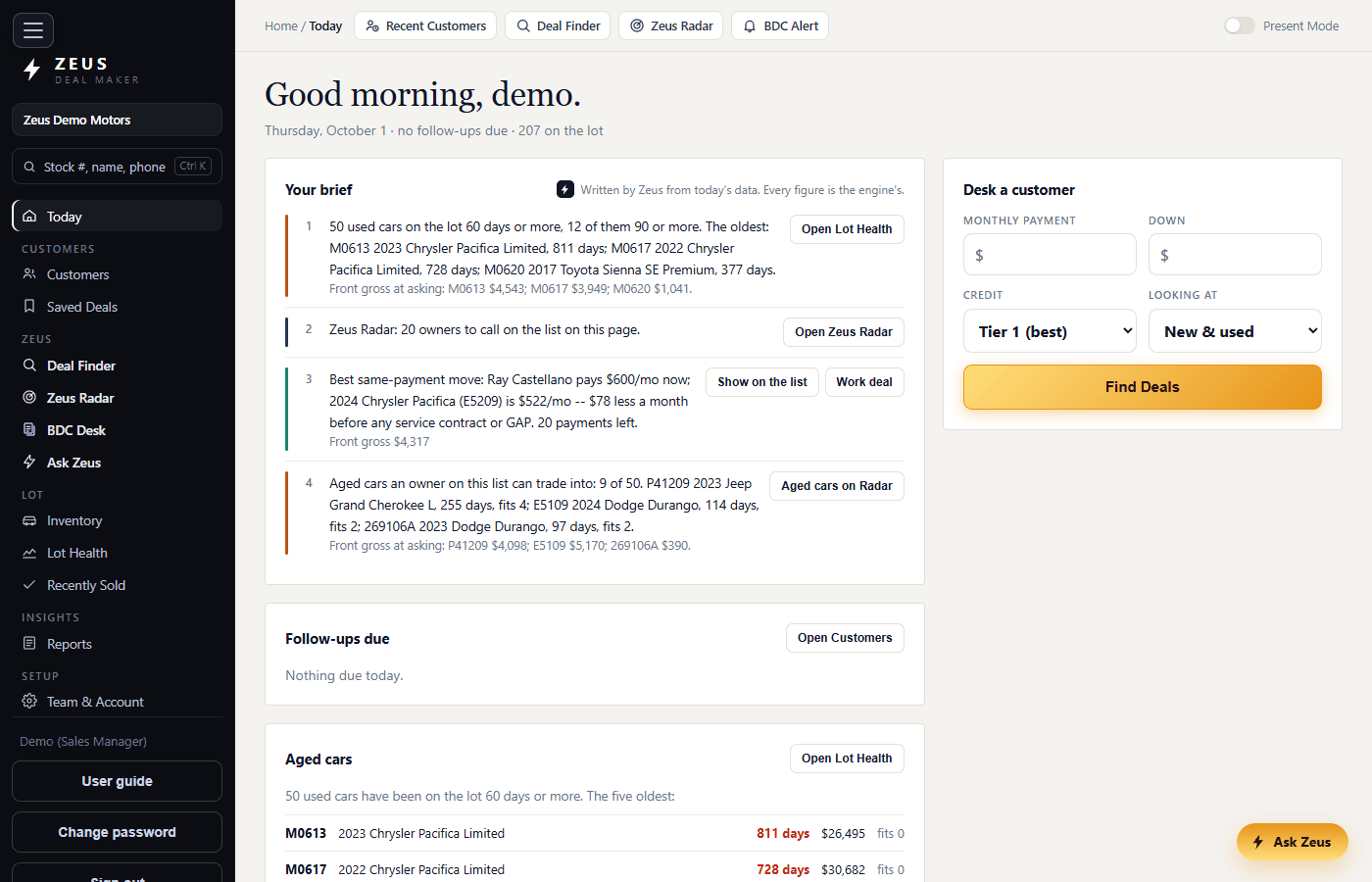
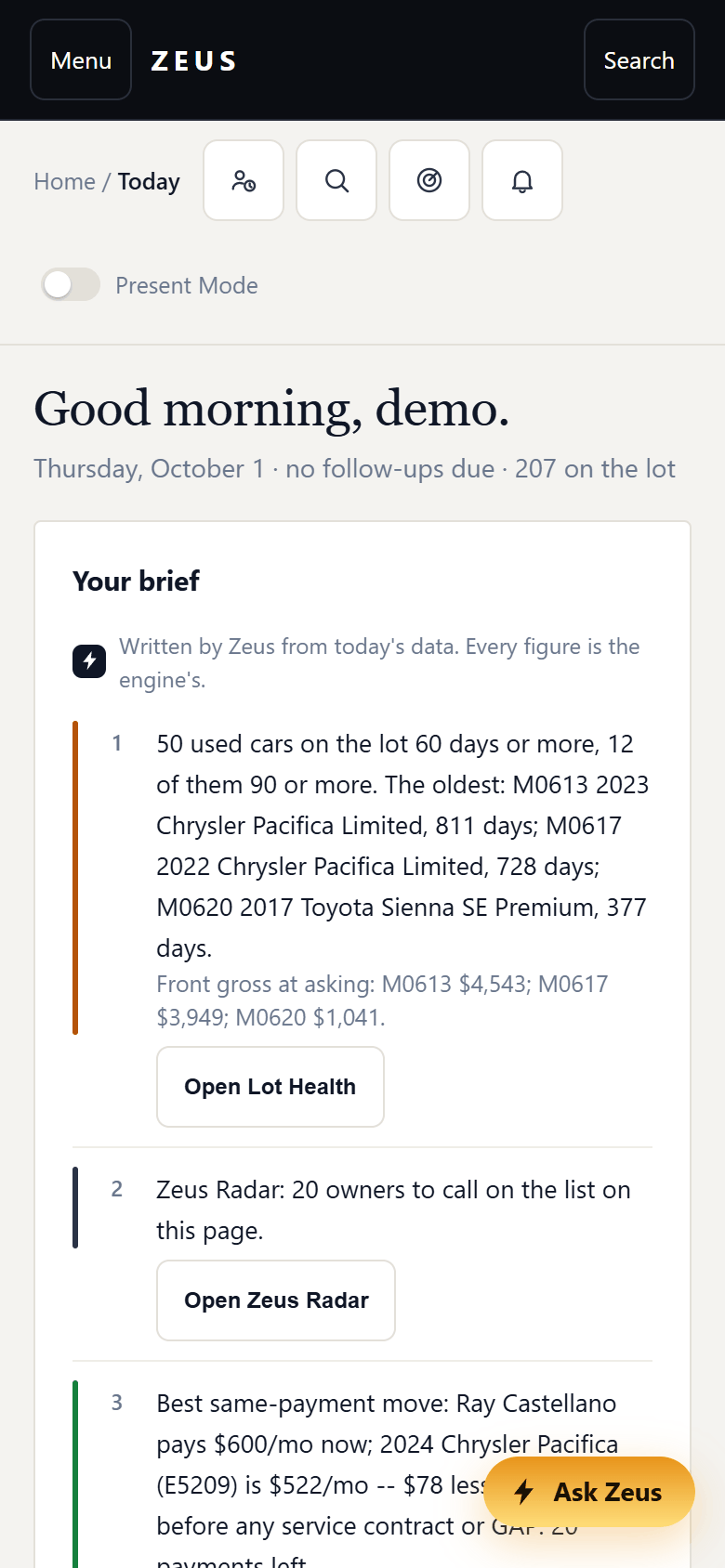
Today
The first screen of the day: follow-ups due, the oldest units, the next owners to call, and a box to desk the customer who just walked in.
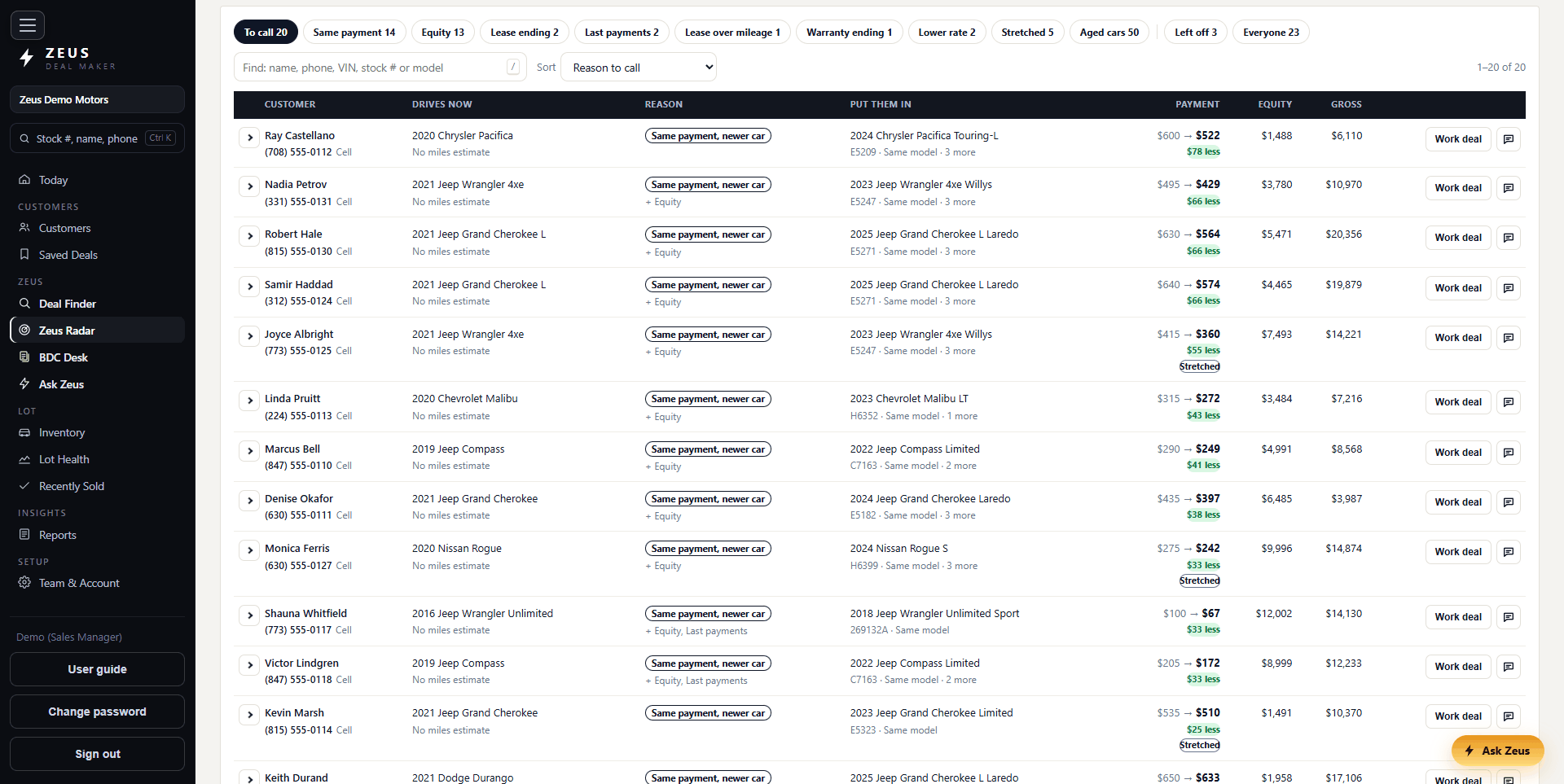
Zeus Radar
Upload the owner list and every owner is worked against the lot: same payment on a newer car, equity, a lease or a loan ending, lease miles, a warranty running out, a rate they could beat.
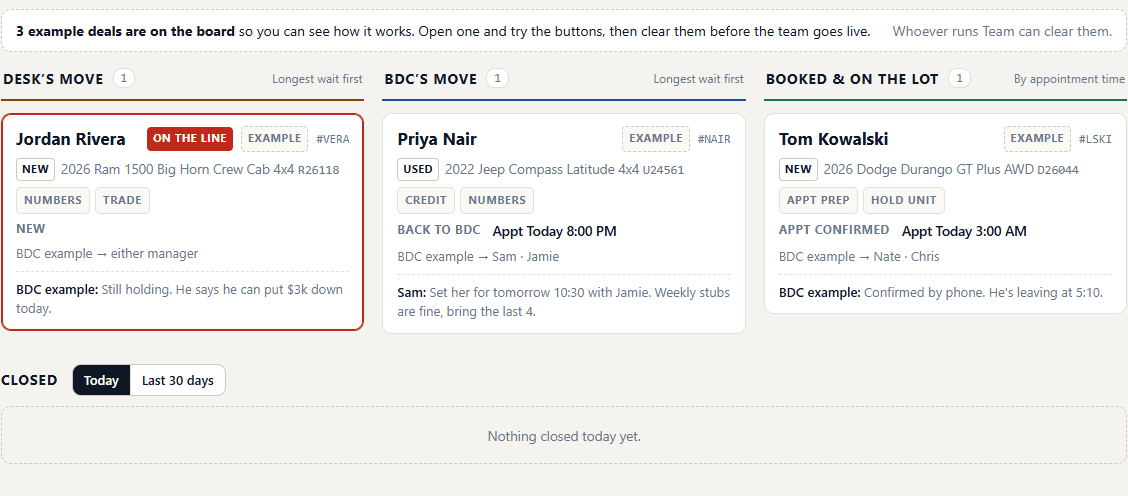
BDC Desk
The BDC sends the sheet with the customer still on the line, the desk sends the numbers back, and both sides watch one live board.
Customer cards
Work a deal for a customer and the quote lands on their card: the car, the payment, the day, and the follow-up that is due.
Solve for down
Type the payment they gave you. Zeus works out the cash down that gets there.
Payment matrix
Three terms across three downs, all nine solved at once, ready to turn around.
Trade allowance and payoff
Both go in separately, so negative equity lands where it belongs in the deal.
Buy rate and sell rate
Reserve is worked off the spread, including a subvented 0% or 0.9% without the store rate overwriting it.
Compare Lenders
Every lender you have saved, at that tier: payment, max advance, funds or over, and the reserve on each.
F&I menu
Warranty and GAP with the monthly bump and the back gross on each one.
Present Mode
One click drops cost, book and gross off the screen before you turn it around. The server stops sending them, so they are not sitting in the page.
Leases on new
Manufacturer residuals and money factors, capitalised fees, and both Chicago lease taxes. Reproduces a real Chrysler Capital deal to the cent.
Ask it in English
“What’s certified under $25,000.” Every figure in the answer comes out of the same engine as the board, and a rep never gets sent cost or gross.
Lot Health
Age, price to market and gross potential on every unit, sorted by whichever one is keeping you up.
Morning website check
Emailed before you get in: advertised and already sold, on the desk and not advertised, priced one way online and another on the desk.
Feeds that run themselves
Inventory, books and photos arrive on their own. A file that turns up far short of the lot is refused and yesterday's inventory stands.
Listing copy
Written from the options actually on the car and checked back against them. One version for the syndication sites, one for your own site.
Permissions per person
Four roles to start from, then set any of eighteen permissions on any individual.
Print and export
The quote for the customer, the ranked board to Excel or PDF, the sold log, the website check.
Recall check
Open safety recalls per VIN, on the row, so nothing certifies with one outstanding.
The morning, on one screen.
Sign in and the day is waiting: the follow-ups that are due, the units that have sat longest, the next owners Zeus Radar says to call and the car to put each one in, and a box to desk whoever just walked in. The quick links along the top go straight to your customers, Deal Finder, Zeus Radar and BDC Desk.
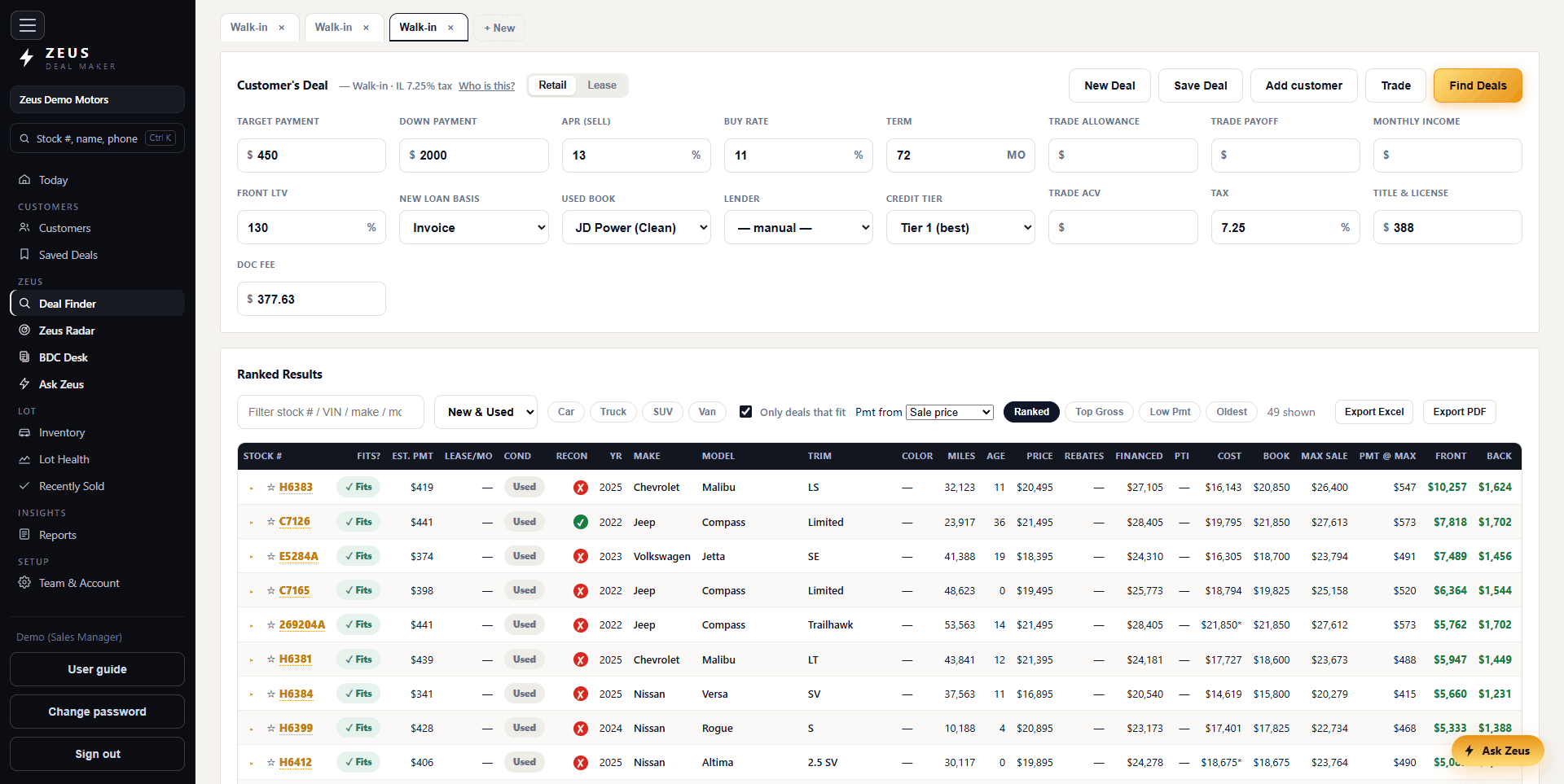
Every unit, ranked by what fits.
Type the payment, the down and the trade. Every car on the lot comes back with its payment, whether it fits, and what it grosses front and back, ranked inside what fits. Filter by body or by new and used, and export the board to Excel or PDF.
Every number on one screen.
Pick a car off the ranking and it opens in a pop-out. Sale price, down, trade allowance and payoff, rebates, APR, term, tax and fees together, with the payment and the gross recomputing as you type. Print or save the quote when it lands.

Your owners, worked against the lot.
Export your sold customers from the DMS and upload the file. Every owner goes through the same engine as the desk and comes back with one reason to call and the closest car that fits: the same payment on a newer car, equity, a lease or a loan about to end, lease miles, a factory warranty running out, a rate they could beat. Add tomorrow's service appointments and the list is who is in the building. Take it to your CRM or print it; Zeus keeps nobody on it. On the demo, press Try it with a sample owner list.
The BDC and the desk, on one sheet.
The BDC sends a deal sheet while the customer is still on the phone: the car, the trade, the payment they want and the question. A manager takes it and sends back what to say, what to bring and who they will see. Both sides watch the same board, live, and a red count on BDC Alert says what is waiting. On the demo, sign in as demobdc for the BDC's side.
A chat box on every screen.
Ask it the way you would ask a manager. What is silver with under 60,000 miles. What is certified under $25,000. The answer comes from the lot as it stands, and the next question narrows the last search. Click a car in the answer to open it.

What every unit is costing you.
Days on the lot, price to market as a percentage, and gross potential on every car, on one screen. Aged units surface first if that is how you want it sorted, and once Zeus Radar has run, each one says how many of your owners could trade into it.

The website check, every morning.
Zeus compares your website against your desk overnight and emails the people you choose. Sales and inventory reports sit alongside it, filtered by make and printed off the screen. Every row exports to Excel.

Off the desk, it still works.
Every screen fits a phone. The menu folds away, the quick links become buttons under your thumb, and a manager on the lot sees the same day, the same board and the same numbers as the desk.
One monthly fee per rooftop.
- No per-seat charge. Put every manager, every rep and the BDC on it. Add somebody at four o'clock and the bill does not move.
- No feature tiers. Everything on this page is in it.
- No multi-year lock. The agreement is written per store, and your inventory and deals stay yours.
- Setup and vendor onboarding are done for you, on your own vendor accounts.
There is no free trial, because a desking tool proves nothing on an empty lot. There is a demo instance you can open right now, and a live session on your own inventory whenever you want one.
Go and work a deal on it.
The demo is a real Zeus with a real lot on it. Sign in as demo / DriveZeus26, put in a payment and see what comes back. Or sign in as demobdc / DriveZeus26, send the desk a deal sheet and see the desk's answer.